
TL;DR
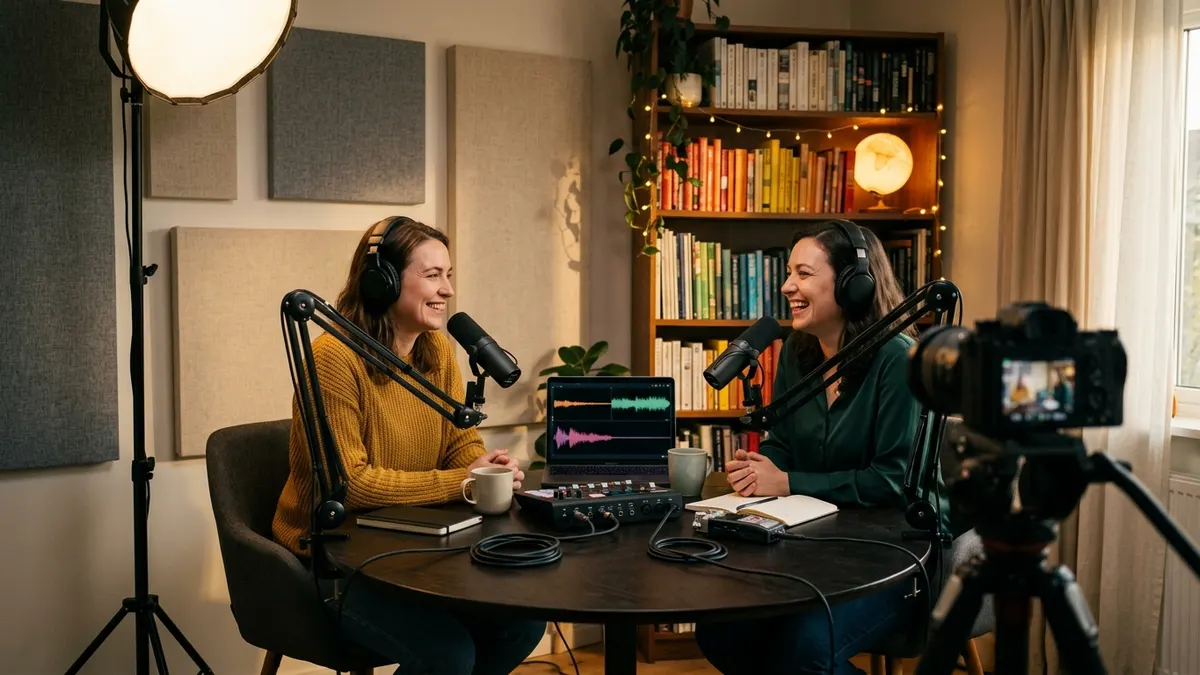
Podcasting has quietly become a video medium, and that changes what a podcast room has to do. The Infinite Dial 2026 found that 58% of Americans 12+ consumed a podcast in the last month and 57% have both listened to and watched one. Edison Research reports that weekly podcast consumers are now just as likely to watch as to listen, YouTube is the number one podcast platform in the U.S. as of Q3 2026, and Netflix started carrying video podcasts in January 2026. Spotify says more than 500 million users have streamed a video podcast. Your home podcast studio is no longer just a quiet corner with a microphone. It is a sound space and a set that viewers judge in the first three seconds.
This guide walks through the full podcast room design process: choosing the right room in your home, three podcast studio layouts with key dimensions, the difference between soundproofing and acoustic treatment, where panels actually go, how to design a podcast background that looks good on camera, and how to test your room with real numbers before you hit record. You can plan each step with AI first: AI Floor Plan Generator for the layout, Room Design AI for the room's style, Wall Design AI for the backdrop wall and Furniture Replacement AI for desks, chairs and sofas.
Why Podcast Room Design Matters More in 2026
Three shifts in 2026 make the room you record in more important than the microphone you buy.
Podcasts Are Now a Dual-Format Medium
The Infinite Dial 2026, released by Edison Research at SSRS in March 2026, set new records across the board: 80% of Americans 12+ have ever listened to or watched a podcast, 58% did so in the last month and 45% in the last week. It also found that 57% have both listened to and watched a podcast (SSRS). "Video isn't replacing podcast audio. It's expanding the tent," said Edison's Megan Lazovick.
Edison's Podcast Consumer 2026 report adds the turning point: in Q3 2025, 82% of weekly podcast consumers were actively watching video podcasts versus 78% listening to audio only. In 2023 the split was 89% audio-only to 73% video (Podnews). For a home podcast studio, that means your podcast room design has to work for the camera, not just the microphone.
YouTube, Netflix and Spotify Are Competing for Video Podcasts
As of Q3 2026, YouTube is the platform U.S. weekly podcast consumers use most often, with Spotify second at 17%, Apple Podcasts at 9% and Netflix in seventh place at 3% (SSRS). Netflix and Tubi entered podcasting in January 2026, and in Q1 2026 14% of weekly podcast consumers had already used Netflix to watch or listen to podcasts. Netflix also signed a deal reported as worth up to $100 million for video versions of Jay Shetty's On Purpose (SSRS). Spotify, meanwhile, says more than 500 million users have streamed a video podcast, up nearly 50% year over year (Spotify).
When your show sits next to professionally produced studio sets on a TV screen, a cluttered bedroom background and an echoey room stand out fast.
Audiences Want AI Behind the Scenes, Not in the Host's Chair
AI is the other big podcast story of 2026, and listeners have nuanced views. In Edison's research, 69% of podcast consumers approve of AI for research and 69% for brainstorming, but 62% see AI as a threat to the credibility of podcasts (Podnews). When Edison asked how weekly listeners would feel if their favorite host started using an AI-generated version of themselves, 66% reacted negatively: a third said they would feel "deceived" and another third "upset" (SSRS).
A cautionary story from October 2026 shows why. Podnews reported on a podcaster who stopped publishing, only to discover that someone had taken over his podcast account, moved the show to a new host, cloned his voice and kept releasing episodes that earned $1,293 before the show was returned to him (Podnews).
The practical takeaway for podcast room design: invest in the room that captures your real voice, then use AI for the production work around it, such as layout planning, set design, intros, music and transcripts.
Choosing the Right Room for a Home Podcast Studio
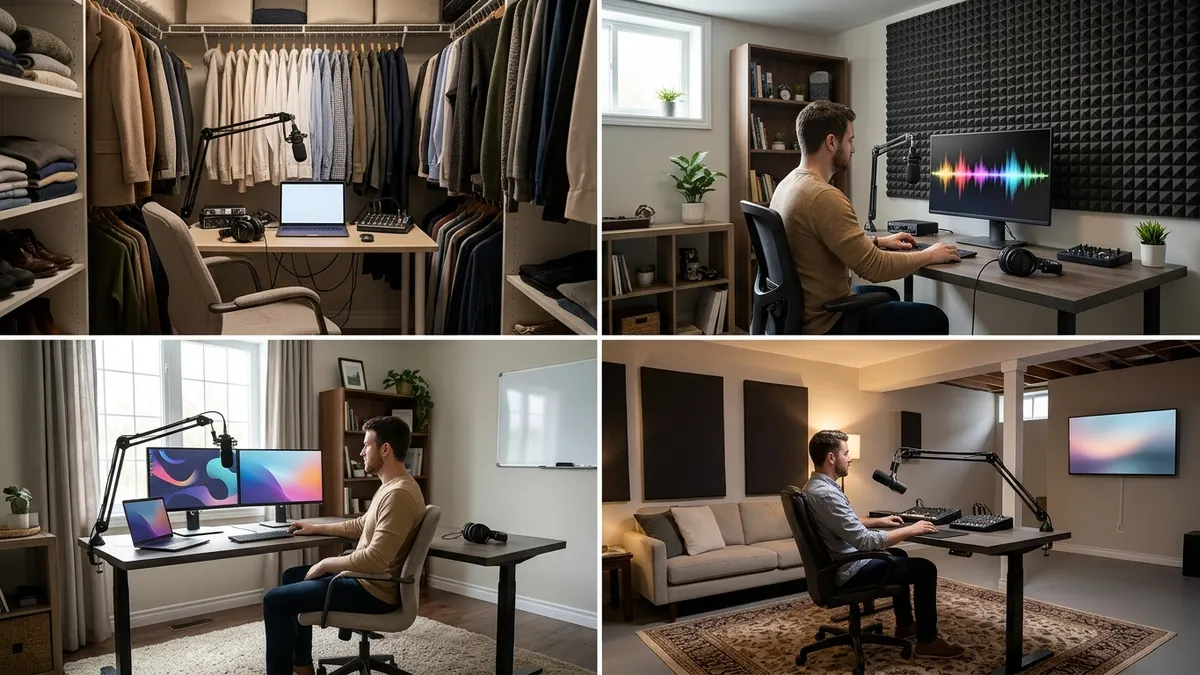
The best podcast room is rarely the biggest or prettiest room in the house. It is the one with the fewest noise problems and the most room to work with.
What to Look For
- Distance from noise: away from the street, the laundry room, the kitchen and shared walls with neighbors. Noise you never notice in daily life, such as a refrigerator compressor or a heating vent, shows up clearly in a recording.
- Size and shape: very small rooms boom, and perfectly square rooms or rooms with large bare parallel walls tend to ring. A rectangular room of moderate size is easier to treat.
- Soft surfaces already there: carpet, curtains, a bed and full bookshelves all help. A room with hard floors and bare walls needs more treatment.
- A door you can close, and ideally no window directly behind where you will sit on camera.
- Power and network: enough outlets for lights, camera, interface and computer, and a wired internet connection if you record remote guests.
Comparing Common Podcast Room Options
| Room option | Best for | Strengths | Watch out for |
|---|---|---|---|
| Walk-in closet booth | Solo audio shows, voiceover | Clothes absorb sound; very dry recordings | No room for video; can feel boxy and hot |
| Spare bedroom | Solo or two-host shows with video | Enough space for a set and camera depth | Bare walls and hard floors need treatment |
| Home office corner | Solo video podcast | Already wired and furnished | Shared with daily work; background clutter |
| Basement | Larger sets, louder shows | Good isolation from the street | HVAC noise, low ceilings, humidity |
| Living room set | Occasional episodes | Big, attractive backgrounds | Household noise; hard to leave set up |
If you are fitting a podcast studio into a small home, our guide to AI design for small spaces has more ideas for dual-purpose rooms, and the home office design guide covers desk ergonomics that apply to long recording sessions too.
Podcast Studio Layouts: Three Floor Plans That Work
Once you have picked the room, plan the layout before buying anything. The right podcast studio layout puts the microphone in a good acoustic spot, gives the camera depth and keeps cables and people out of each other's way. Each plan below is an AI-generated concept; adapt it to your room's doors, windows and outlets.
Layout A: Solo Podcast Studio (about 10 × 10 ft)
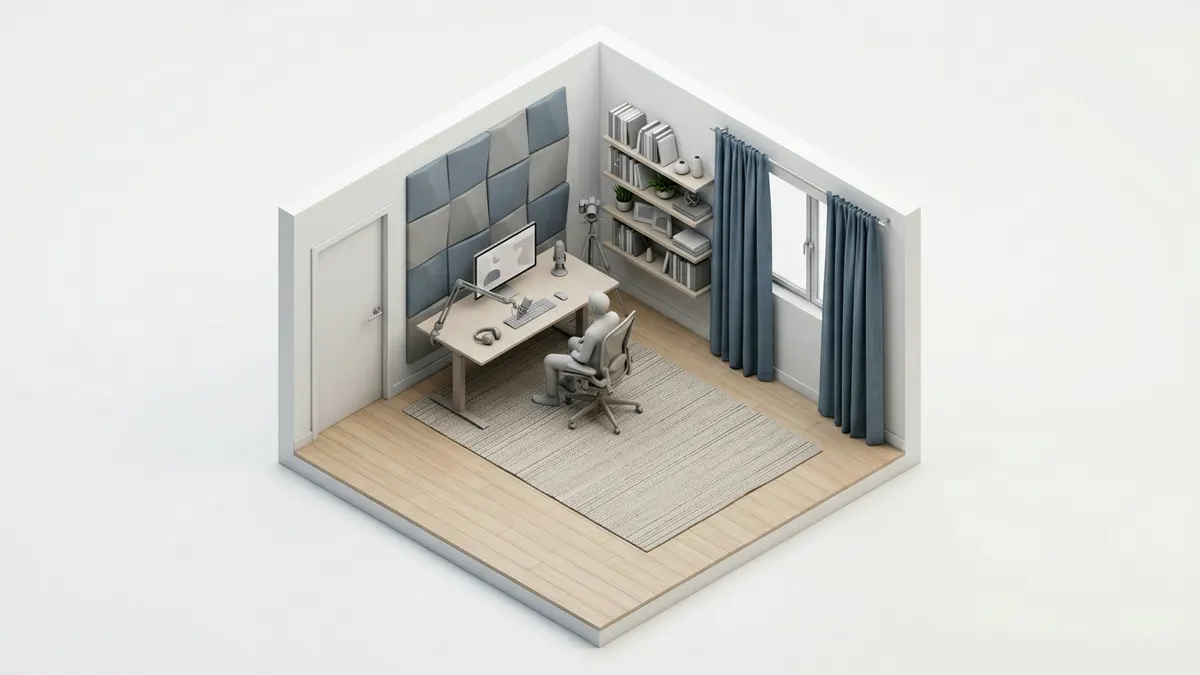
When this layout works best:
- Solo shows, interviews recorded remotely and voiceover work
- Spare bedrooms and home offices
- Creators who record both audio and video
Key planning points:
- Pull the desk off the wall rather than pushing it tight against it. The wall in front of you reflects your voice straight back into the microphone, so it needs absorption either way.
- Microphone distance: most spoken-word microphones sound best about a hand's width to 20 cm (8 inches) from the mouth, slightly off to the side to avoid plosives.
- Camera behind or beside the monitor, at eye level, so you look at your guest and the lens at the same time.
- Background depth: leave as much space as you can between your chair and the wall behind you. Depth lets you light the background separately and makes the shot look more like a studio than a bedroom.
Layout B: Two-Host Interview Studio (about 12 × 14 ft)
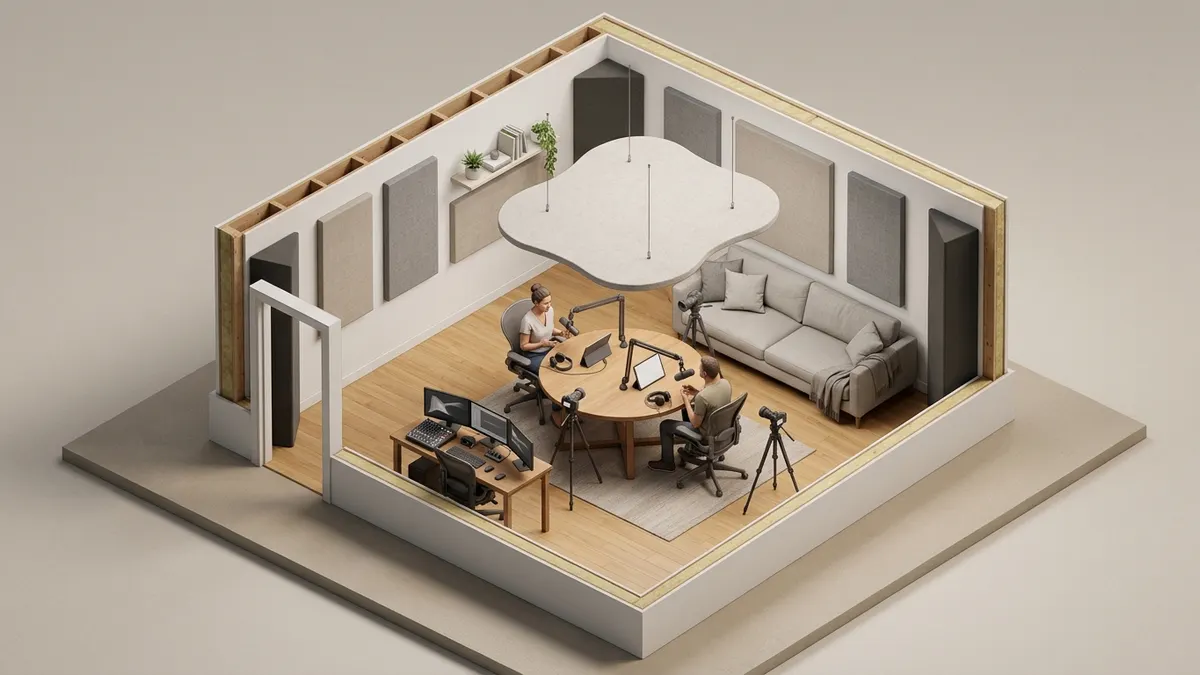
When this layout works best:
- Co-hosted shows and in-person guests
- Spare bedrooms, larger offices and basements
Key planning points:
- Angle the hosts at roughly 90 degrees across a small round or rounded table instead of sitting directly opposite. Each cardioid microphone then points away from the other person, which reduces bleed.
- A rounded table is easier to light and frame than a long rectangle, and it keeps hosts close enough to talk naturally.
- Three camera positions: a wide shot plus one close-up per host. Plan the floor plan so cameras sit behind the other host's shoulder without blocking the door.
- A ceiling cloud (an absorber hung above the table) controls reflections bouncing between the table and the ceiling.
Layout C: Video Podcast Set (about 14 × 16 ft or larger)
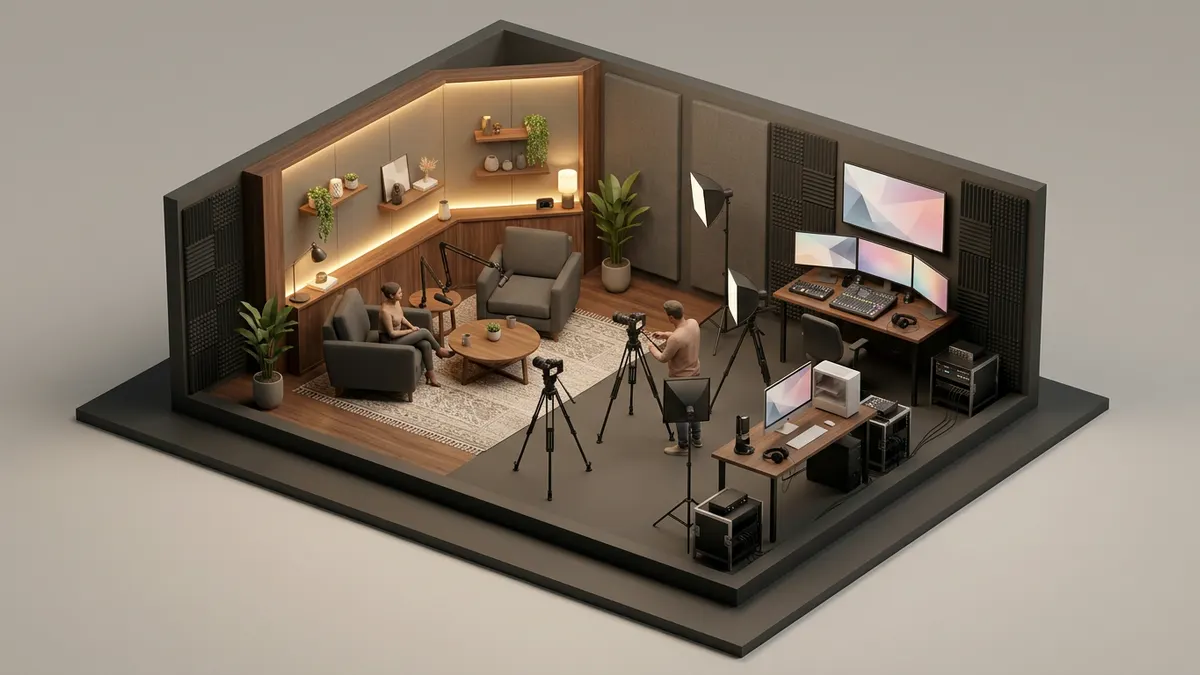
When this layout works best:
- Shows where video is the main product, such as YouTube-first or Netflix-style formats
- Basements, garages that have been finished, and large bonus rooms
Key planning points:
- Split the room in two: the set on one side, the production side (cameras, lights, computer, producer) on the other.
- Lounge chairs or a sofa read as conversational on camera; desks read as news or business. Choose based on your show's tone.
- Lights on stands or a ceiling grid, kept out of every camera's frame. Plan power before you decide where lights go.
- Treat the side walls and ceiling heavily, because a larger room with more hard surfaces produces more reverb.
To try these podcast studio layouts in your own space, open the AI Floor Plan Generator, choose the Studio purpose and describe your room. For example:
Home podcast studio floor plan, 12 × 14 ft spare bedroom with one window on the short wall and the door in a corner. Two hosts at a round table angled toward each other, three camera positions, a backdrop wall with shelves, acoustic panels on side walls, a ceiling absorber above the table and a small producer desk near the door.
Generate a few versions in 2D to compare positions, then switch to 2.5D or 3D to see the camera's point of view. If you already have a plan of the room, the AI Floor Plan Editor lets you adjust it instead of starting over.
Soundproofing vs. Acoustic Treatment: What Your Podcast Room Actually Needs
Most first-time studio builders mix up two different problems. Fixing the wrong one wastes money.
Soundproofing Keeps Noise Out (and In)
Soundproofing stops sound passing between your podcast room and the outside world: traffic, a barking dog, a family member in the next room. It works through mass (heavier walls and doors), sealing (closing air gaps, because sound travels through any gap) and decoupling (separating layers so vibration does not pass straight through). Real soundproofing is a construction project.
For most home podcast studios, the affordable steps are:
- Seal the door: add a door sweep and weatherstripping, or replace a hollow door with a solid one.
- Deal with windows: heavy curtains help a little; a removable window plug made from dense board and absorbent material helps much more.
- Turn things off: heating and cooling, fans, refrigerators and noisy computers during recording.
- Schedule around noise: record when traffic, deliveries and household activity are quietest.
Acoustic Treatment Controls How the Room Sounds
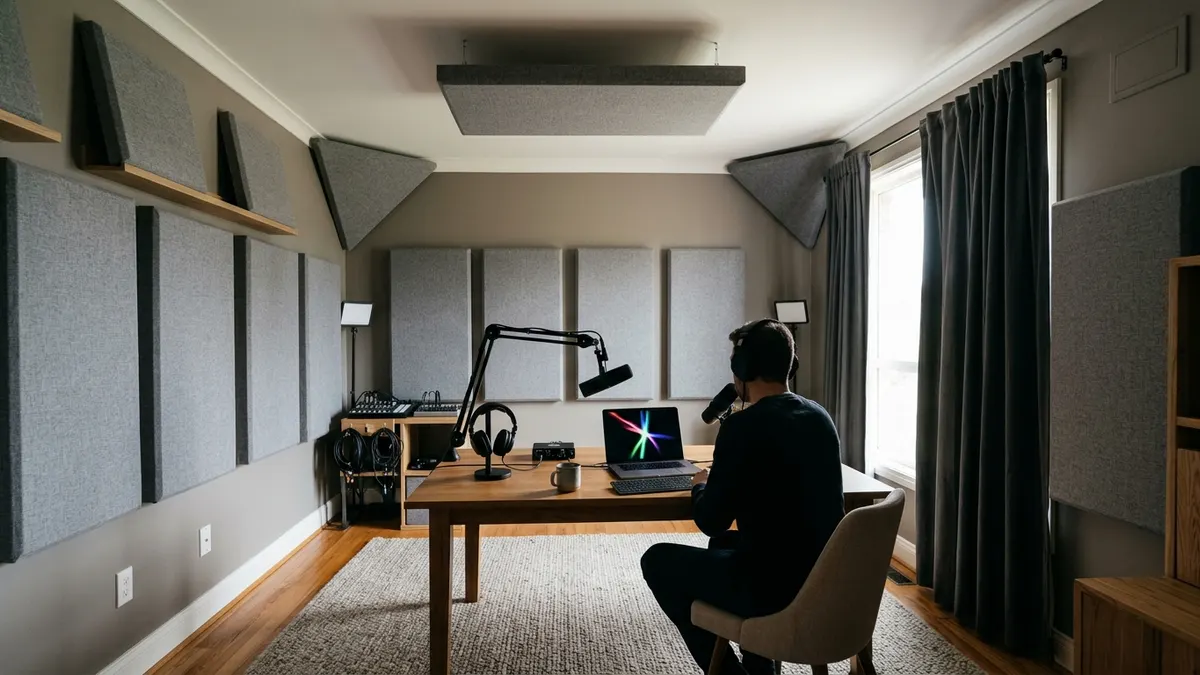
Acoustic treatment controls what happens to your voice inside the room: echo, flutter between parallel walls and the hollow, "talking in a bathroom" sound that comes from reverb. It will not stop a lawnmower outside, but it is what turns a bedroom into a podcast room.
One way to think about reverb is reverberation time: how long sound takes to die away after it stops. For context, the Acoustical Society of America's guidance for classrooms sets a maximum of 0.6 seconds for core learning spaces up to 10,000 cubic feet, so that speech stays intelligible (Acoustical Society of America). A podcast room should sound noticeably drier than a classroom, because the microphone is far less forgiving than a listener sitting in the room.
How to Read Acoustic Panel Ratings
When you shop for panels, look for the NRC (Noise Reduction Coefficient). It is the average of a material's sound absorption coefficients at 250, 500, 1,000 and 2,000 Hz, measured with the ASTM C423 test method. An NRC near 0 means the material reflects almost everything; an NRC near 1.0 means it absorbs almost all the sound that hits it in that range. Thin decorative foam often scores low and mostly tames high frequencies; thicker panels made from mineral wool or fiberglass do far more.
Where to Put Acoustic Panels in a Podcast Room
Treatment works best where reflections reach the microphone first:
- The wall you face: your voice travels forward, hits this wall and bounces back into the microphone. This is the most important spot in a podcast room.
- Side walls beside the desk: use the mirror trick. Sit in your recording position while someone slides a mirror along the side wall; wherever you can see the microphone in the mirror is a first reflection point.
- The ceiling above the desk: a ceiling cloud or hanging panel stops the bounce between desk and ceiling.
- The wall behind you: for video, this is also your background, so treatment here should double as decoration (see the podcast set design section below).
- Corners: in larger rooms, thick corner absorbers (often called bass traps) help with low-frequency boom.
- The floor: a thick rug under the desk and chairs reduces reflections from hard floors.
Use What You Already Own
Before buying anything, rearrange. Bookshelves full of books of different sizes break up reflections. Sofas, upholstered chairs, heavy curtains, rugs and even a bed absorb sound. Many good-sounding home podcast studios are simply bedrooms with the furniture moved to the right places.
Do the clap test before and after each change: clap once sharply and listen. A ringing, metallic tail means flutter echo between parallel surfaces; a long, washy tail means too much reverb overall. You can preview soft furnishings and new flooring in a photo of your room with Furniture Replacement AI and Floor Design AI before you buy them.
Test Your Podcast Room Before You Record
Ears adapt quickly to a room, so it is easy to convince yourself that a space sounds fine. Measuring takes the guesswork out of podcast room design, and it is the step most home studio guides skip.
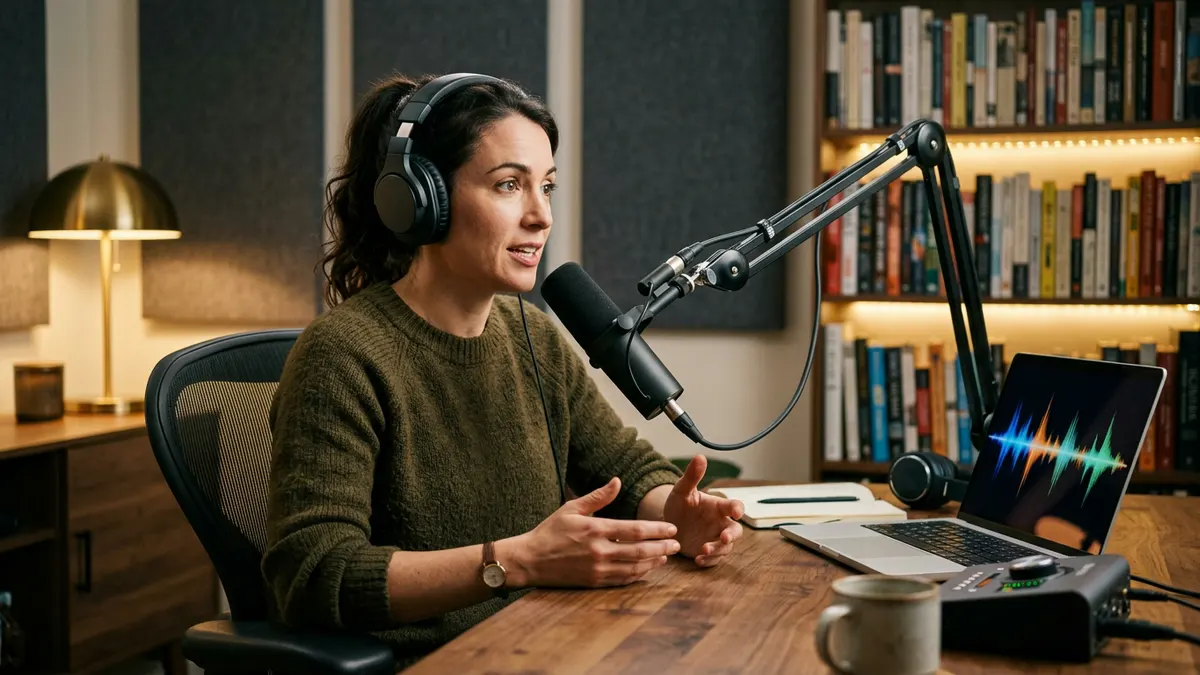
A Before-and-After Workflow
- Record a baseline in the untreated room, at your normal speaking distance, with the door closed and the usual household noise.
- Make one change at a time: move the desk, hang a panel, add a rug or seal the door.
- Test again and keep a simple log of the numbers.
- Stop when the numbers stop improving. Past a certain point, more panels make little difference and can make a voice sound dull.
A browser-based tool makes this quick. Audio AI Studio, an AI audio platform for voices, music and transcripts, has a free mic test that runs in the browser with no sign-up. It listens to five seconds of silence to measure the room, then to one sentence read aloud, and gives a score out of 100 with one fix per problem. According to the tool's own guidance, the useful numbers for a podcast room are:
| What it measures | What to aim for | What it tells you about the room |
|---|---|---|
| Voice level | Roughly −32 to −10 dBFS, with peaks below −1 dBFS and no clipping | Whether your microphone distance and gain are right |
| Room noise gap (voice vs. room) | 40 dB or more is a quiet room; under 20 dB means the room competes with you | How well your soundproofing and noise control are working |
| Frequency range | Full range, not cut off around 4 kHz | Catches Bluetooth headsets stuck in call mode |
| Mains hum | None at 50 or 60 Hz | Ground loops from USB cables, chargers or power strips |
| Echo | Round trip in milliseconds and echo level | Speaker bleed and reflections in the room |
The room noise gap is the most useful number for podcast room design. If it stays low after acoustic treatment, the problem is noise coming in from outside or from equipment, which is a soundproofing or noise control issue, not something more panels will fix.
Mastering Targets for Publishing
A good room makes post-production easier, but your finished episode still needs consistent loudness. Apple recommends that podcast audio be prepared so its overall loudness sits around −16 LKFS (±1 dB) with true peaks no higher than −1 dBFS, measured according to ITU-R BS.1770 (Apple Podcasts for Creators). Recording in a quiet, controlled podcast room leaves more headroom to hit those targets without bringing up background noise.
Podcast Set Design: Building a Background That Works on Camera
With video now central to podcasting, your podcast background is part of your brand. The best podcast set design is also good acoustic design: the same bookshelves, panels and textiles that make a room sound better also make it look like a studio.
Layer the Background for Depth
A strong podcast background has three layers:
- Foreground: the host, the microphone and maybe a mug or a plant at the edge of the frame.
- Midground: a shelf, a lamp or a piece of furniture a few feet behind the host.
- Background: the wall itself, lit separately with color or texture.
The more distance between the host and the back wall, the easier it is to light each layer and the more professional the shot looks.
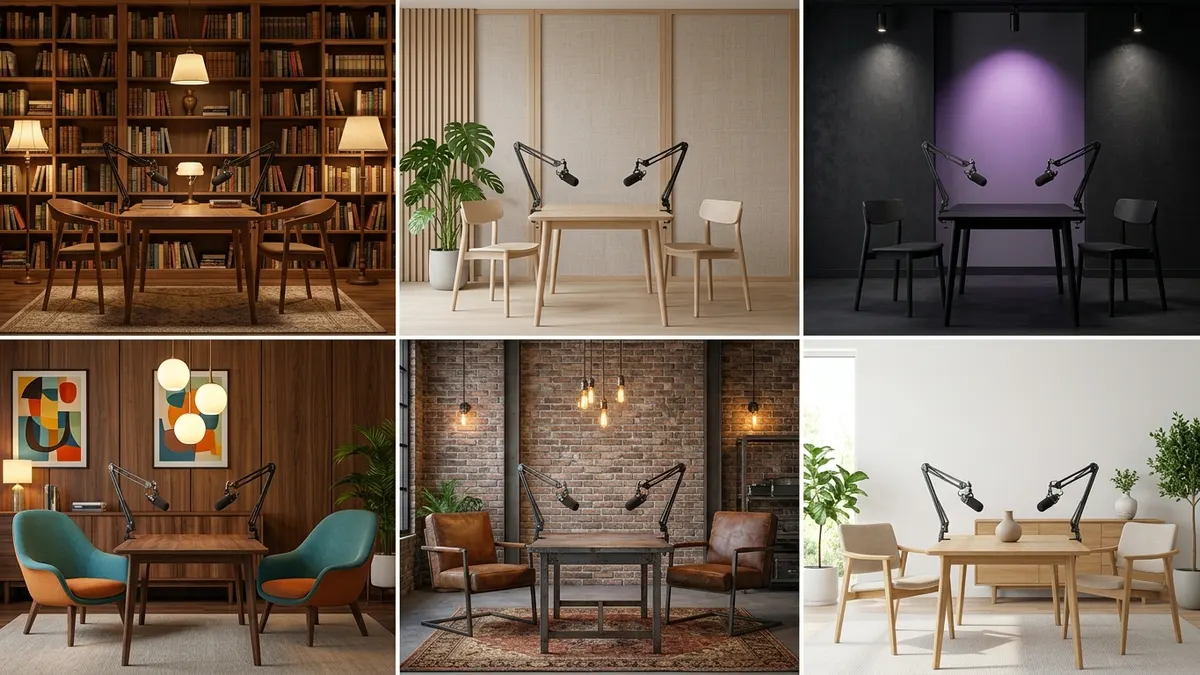
Six Podcast Set Styles for 2026
1. Warm Library
Character: floor-to-ceiling shelves, warm wood, table lamps and a leather chair. Full shelves of books diffuse sound, so this is one of the best-sounding podcast backgrounds as well as one of the most popular.
Best for: interview shows, business, history and books.
2. Japandi Minimal
Character: pale wood slats, linen, a single plant and soft neutral tones. Wood slat panels with an absorbent backing look calm on camera and help control reflections.
Best for: wellness, design, mindfulness and slow, thoughtful conversation.
3. Moody Studio
Character: dark walls, controlled spotlights, colored accent lighting on the back wall and deep shadows. It looks cinematic and hides imperfect rooms well.
Best for: culture, music, gaming and late-night formats.
4. Mid-Century Lounge
Character: walnut tones, curved armchairs, globe lamps and a low table. It reads as relaxed and conversational, ideal for lounge-style two-host shows.
Best for: comedy, lifestyle and co-hosted conversation shows.
5. Refined Industrial
Character: exposed brick or concrete softened with rugs, leather and warm light. Keep the look, but treat the acoustics heavily; hard industrial surfaces are the hardest to record in.
Best for: tech, entrepreneurship and maker shows.
6. Bright Scandinavian
Character: white or pale walls, light wood, greenery and soft daylight-balanced lighting. Clean and friendly on camera, but add fabric panels or a large rug so the room does not sound bright too.
Best for: education, parenting and family topics.
Upload a photo of your room to Room Design AI, choose Study or Home Office as the room type, and start from the closest preset style: Mid-Century Modern, Industrial, Scandinavian, Japanese or Minimalist. For looks without a preset, such as a warm library or a moody studio, describe them in the Custom Requirements field. For a whole-room concept, AI Home Designer works the same way with interior styles and purposes.
Design the Backdrop Wall
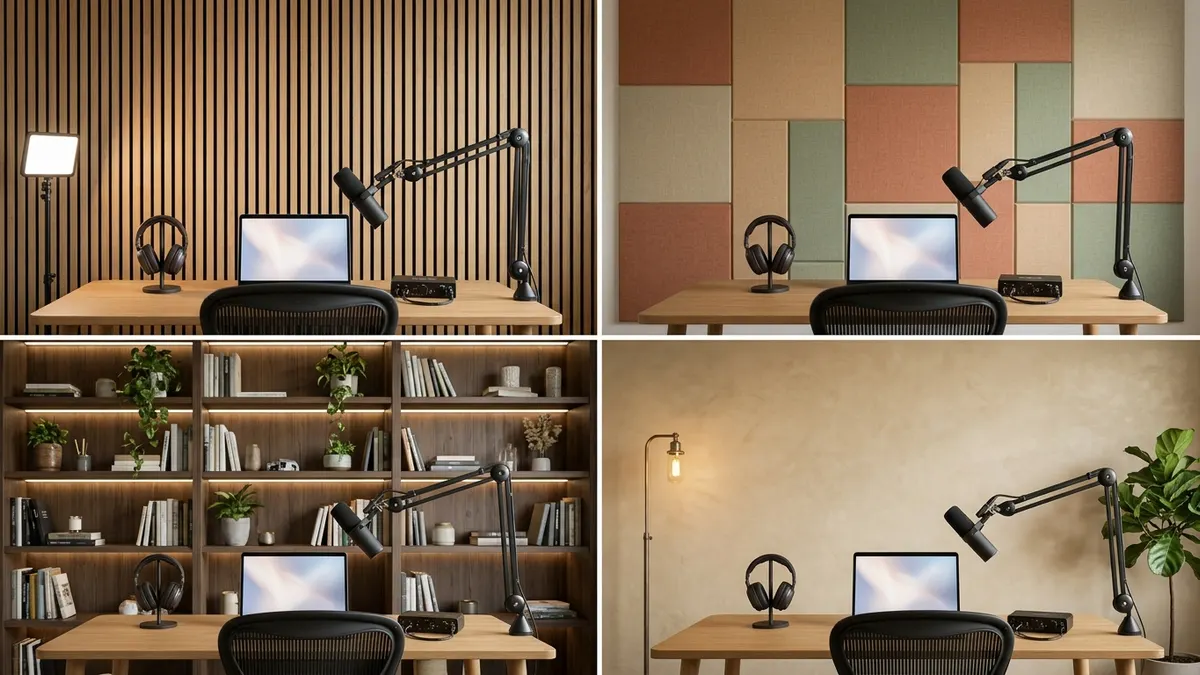
The backdrop wall is the single most visible surface in a video podcast. Good options include:
- Wood slat panels on an absorbent backing: warm, modern and acoustically useful.
- Fabric-wrapped panels in a pattern or color block: treatment that looks deliberate instead of improvised.
- A styled bookshelf: books, objects and plants, lit from within.
- A painted or lime-washed accent wall with practical lamps, plus treatment elsewhere in the room.
Take a photo of the wall and try wood paneling, upholstered panels, lime wash or paint with Wall Design AI before committing. Swap the chair, desk or sofa in the same photo with Furniture Replacement AI to see the full set.
Lighting for a Video Podcast Set
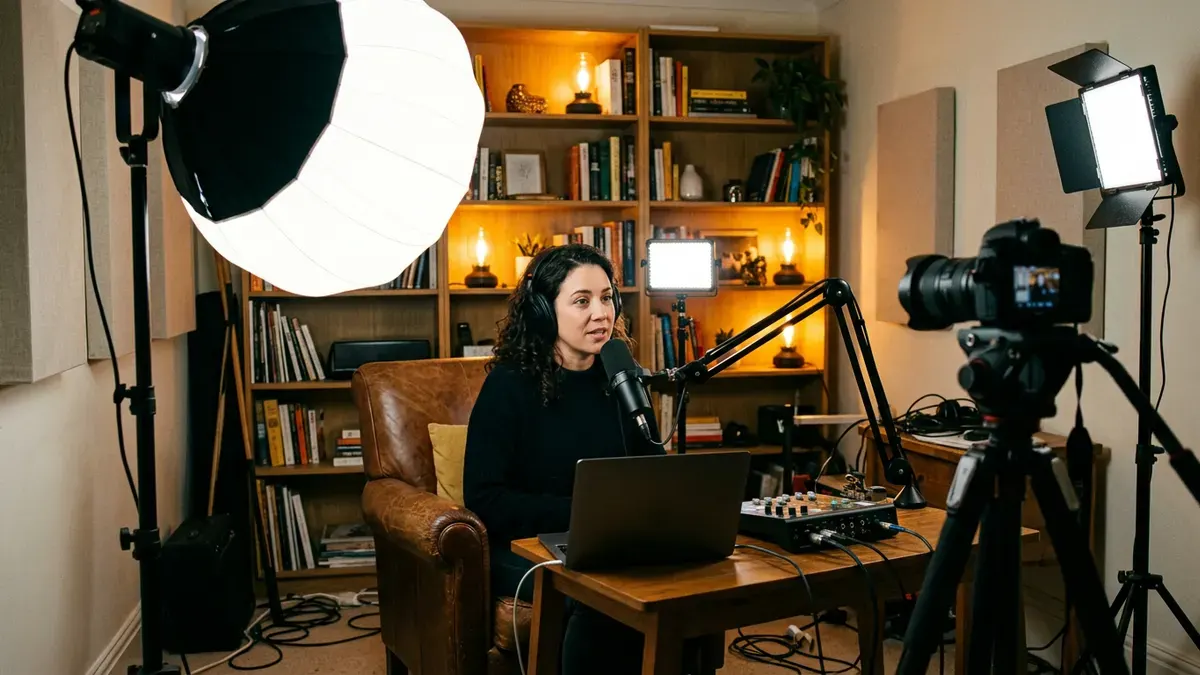
- Key light: a large, soft light slightly to one side of the camera, the main light on each host.
- Fill light: a dimmer light on the other side to soften shadows.
- Back light: a light behind the host to separate them from the background.
- Practicals: lamps visible in the shot that add warmth and depth.
- Match color temperature: keep all lights at the same color temperature, and avoid mixing them with daylight from a window that changes during a long recording.
- Never sit with a window behind you: the camera exposes for the bright window and you become a silhouette.
How to Design a Podcast Room with AI: Step by Step
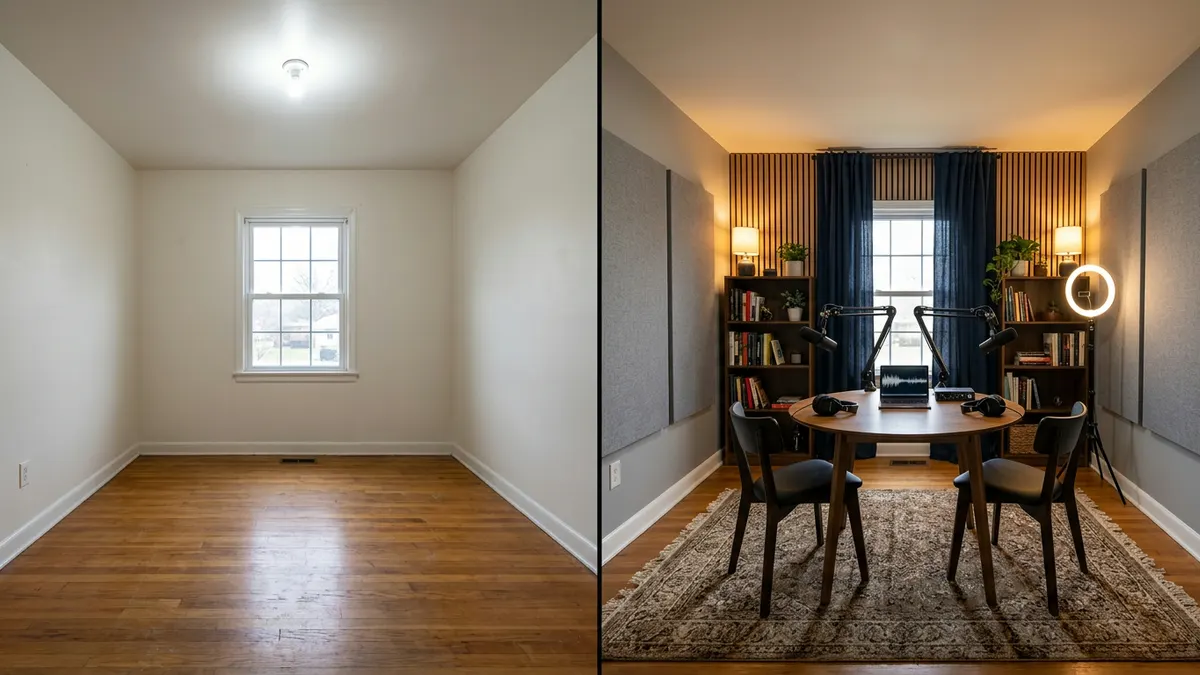
AI will not hang panels for you, but it can save you from buying the wrong furniture or arranging a room badly. Here is a practical workflow from empty room to first episode.
Step 1: Plan the Podcast Studio Layout
Generate layout options with the AI Floor Plan Generator using the Studio purpose, and compare desk, camera and set positions. Check each version against the acoustic placement points above.
Step 2: Choose the Room's Style
Upload a photo of the room to Room Design AI and compare podcast set styles. Pick one that suits your show's tone and works on camera.
Step 3: Design the Backdrop and Furniture
Test backdrop finishes with Wall Design AI, flooring with Floor Design AI, and chairs, desks and sofas with Furniture Replacement AI.
Step 4: Build, Treat and Measure
Rearrange first, add treatment at the first reflection points, seal the door and run the mic test again after each change until the room noise gap and echo stop improving.
Step 5: Produce the Show
Use AI where audiences are comfortable with it: behind the scenes. Tools like Audio AI Studio can generate a theme tune or intro music, voice a short ad read, and transcribe each episode into show notes and captions for your video version. Keep the host's voice your own.
Seven Common Podcast Room Design Mistakes
- Buying a microphone before fixing the room: an expensive microphone in an echoey room records the echo in more detail.
- Confusing foam with soundproofing: acoustic panels control reverb inside the room; they do not block outside noise.
- Covering every wall evenly: treat first reflection points and corners first, and leave some surfaces live so voices do not sound dull.
- Recording in the smallest room possible: tiny untreated rooms boom, and they leave no depth for a camera.
- Sitting with a window behind you: bad for video exposure and often the noisiest surface in the room.
- Ignoring background noise sources: refrigerators, air conditioning and computer fans ruin more recordings than room shape does.
- A set that does not match the show: a sleek tech studio for a cozy book show, or a cluttered bedroom for a business interview.
Frequently Asked Questions
What is the best room for a home podcast studio?
The best room for a home podcast studio is usually a spare bedroom or home office away from the street, the kitchen and shared walls. It should have a door you can close, enough space to pull the desk off the wall and leave depth behind you for video, and ideally carpet, curtains or bookshelves already in it. A walk-in closet full of clothes sounds very good for audio-only shows but leaves no room for a camera.
How big should a podcast room be?
A solo podcast room works well at around 10 × 10 ft, a two-host podcast studio at around 12 × 14 ft, and a video podcast set with separate camera and lighting positions at 14 × 16 ft or more. Very small rooms tend to sound boomy and leave no camera depth, so slightly bigger and well treated usually beats tiny. You can test what fits your room with the AI Floor Plan Generator.
How do I soundproof a room for podcasting?
True soundproofing means adding mass, sealing air gaps and decoupling walls, which is a construction project. For most home podcast studios, the practical steps are sealing the door with a sweep and weatherstripping, plugging or heavily covering windows, switching off fans, heating and cooling during recording, and recording at quiet times. Then use acoustic treatment to control echo inside the room.
Do acoustic panels soundproof a room?
No. Acoustic panels absorb reflections inside the room, which reduces echo and reverb and makes your voice sound closer and clearer. They do very little to stop sound entering or leaving the room. If you can hear traffic or household noise in your recordings, focus on sealing gaps and controlling noise sources rather than adding more panels.
What makes a good podcast background?
A good podcast background has depth, separate lighting and a look that matches your show. Popular options include styled bookshelves, wood slat panels, fabric-wrapped acoustic panels in a pattern and painted accent walls with practical lamps. The best podcast backdrops double as acoustic treatment. Try different podcast set designs on a photo of your room with Room Design AI and Wall Design AI.
How can I test my podcast room acoustics?
Start with a clap test to hear flutter echo and reverb. Then measure with a browser-based microphone check such as the free mic test from Audio AI Studio, which reports your voice level, how far your voice sits above the room noise (40 dB or more is quiet), the frequency range, mains hum and echo. Test before and after each change so you know which treatment actually helped.
Can AI design a podcast studio?
AI can design the concept. Tools like the AI Floor Plan Generator can lay out a podcast studio from a written description, and Room Design AI, Wall Design AI and Furniture Replacement AI can show how a set, backdrop and furniture will look in a photo of your room. You still need to build the room, place treatment at the right points and measure the result.
Sources and Methodology
This guide was researched and fact-checked in November 2026. Audience figures come from Edison Research at SSRS and company announcements; technical targets come from Apple and the Acoustical Society of America; mic test thresholds come from the tool's published guidance. Layout dimensions are planning starting points, not building codes. All images in this article are AI-generated concepts for illustration.
- Edison Research at SSRS, "The Infinite Dial 2026," March 12, 2026
- Edison Research at SSRS via Podnews, "Weekly Podcast Consumers Are Just as Likely to Watch as to Listen," June 4, 2026
- Edison Research at SSRS, "The Number 1 Podcast Platform," October 7, 2026
- Edison Research at SSRS, "How Popular is Podcast Consumption on Netflix and Tubi?," June 3, 2026
- Edison Research at SSRS, "Hands Off My Host, AI," September 30, 2026
- Spotify, "Spotify Levels Up Our Podcast Experience With New Features for Fans and Creators," May 21, 2026
- Podnews, "The cloned podcast that carried on publishing," October 26, 2026
- Apple Podcasts for Creators, "Audio requirements"
- Acoustical Society of America, "Classroom Acoustics for Architects"
Start Designing Your Podcast Room
The podcasts that stand out in 2026 sound close and clear and look like they were made on purpose. You do not need a professional studio for that, just a well-chosen room, a sensible layout, treatment in the right places and a set that fits your show.
Plan Your Podcast Studio Layout →
Describe your room, choose the Studio purpose and compare solo, two-host and video podcast layouts in minutes.
Preview Your Podcast Set Design →
Upload a photo of your room and see it in Scandinavian, Japanese, Industrial or Mid-Century Modern style, or describe your own podcast set in Custom Requirements.
Design Your Podcast Backdrop Wall →
Try wood paneling, upholstered panels, lime wash and paint on your actual wall before you build anything.